Live Event Grafix
Professional live graphics suite for macOS and Windows with lower thirds, overlays, lyrics/scripture, motion graphics, streaming, and hardware output control.
Platforms: macOS, Windows
Version 1.0.12
v1.0.12 production release for macOS; Windows remains on v1.0.11.
- • Lower Thirds with 112+ Rive animation styles, plus support for custom .riv designs.
- • Built-in overlays for timers, tickers, logo bugs, announcements, credits, song lyrics, and scripture.
- • Live Soccer Grafix is included as a module inside Live Event Grafix through the in-app app selector.
- • Hardware + output workflows with ATEM, DeckLink, NDI, Syphon, Preview/Program control, and RTMP/SRT streaming.
- • Automation and control via macro banks, WebSocket server, REST API, Sports Mode, and project save/load tools.
App Screenshots
Accurate captures from the app
These are real product screens, captured from the current desktop apps so download visitors can see the operator workflows before installing.
Key Functions Explained
Broadcast Graphics Core
Create and animate lower thirds, tickers, timers, announcements, credits, and logo bugs with tab-based control, live preview, and fast take/hide actions.
Media, Adverts & SuperSource
Run media playlists, ad rotations, L-shape sponsor layouts, and ATEM SuperSource presets from dedicated operator tabs.
Designer + Motion Pipeline
Use the built-in Graphics Designer layer system and motion background workflows to build reusable show packages, then save/load projects for rapid deployment.
High-Level User Manual
Operator views and workflows
A guided tour of the current Live Event Grafix 1.0.12 interface, including the embedded Live Soccer Grafix module inside the app.
Live Event Grafix
Main Operator Control Surface
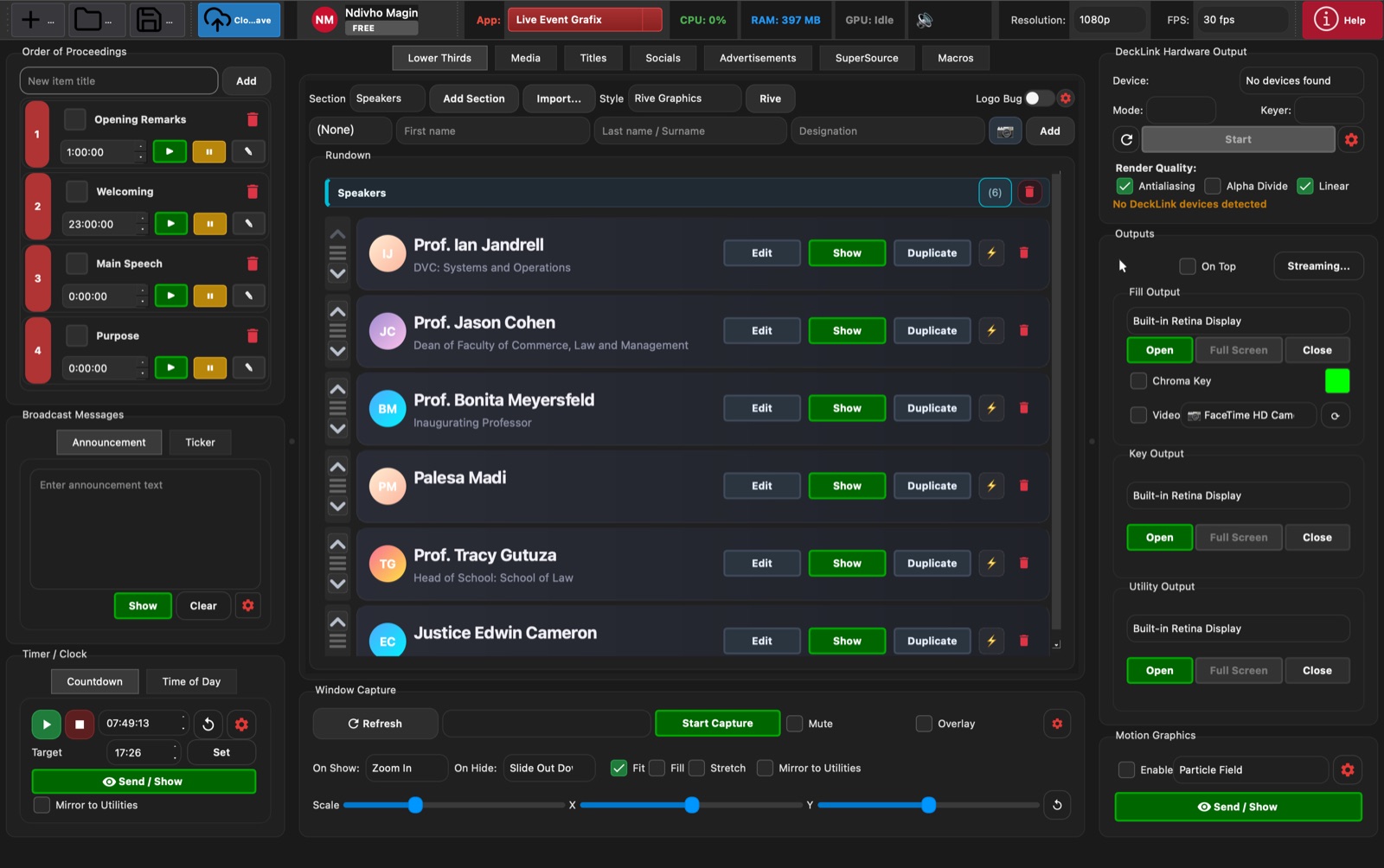
The main Live Event Grafix workspace combines the show rundown, lower thirds, output controls, timers, broadcast messages, capture tools, and motion graphics in one operator view.
- • Build and run an order of proceedings from the left-side rundown.
- • Trigger lower thirds, announcements, tickers, timers, and motion graphics from one surface.
- • Open fill, key, and utility outputs, then route them to the display or switcher workflow.
- • Start window capture and choose show/hide transitions without leaving the main app.
Live Event Grafix
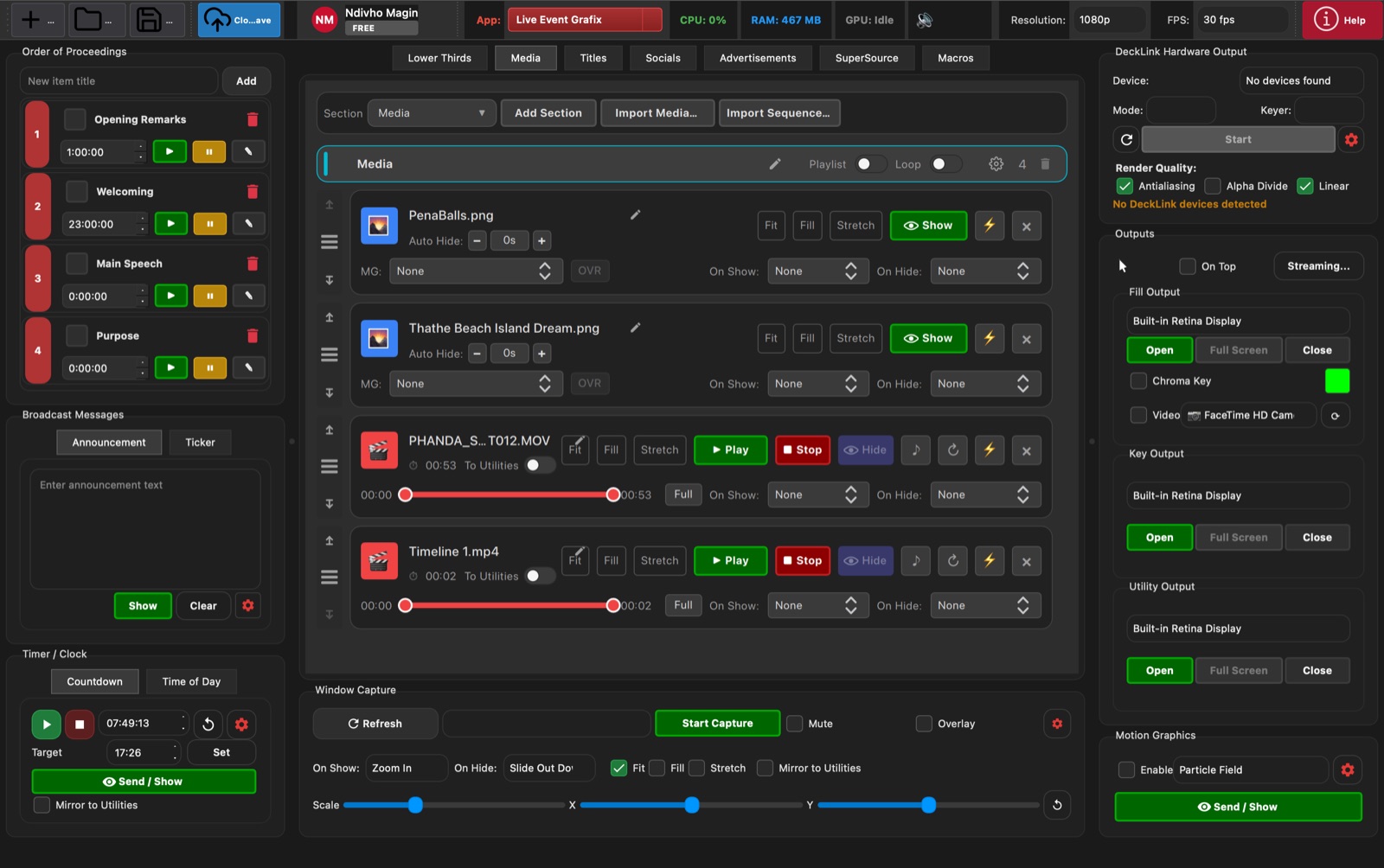
Media Playback
The Media tab manages stills, videos, playlist playback, transitions, scaling, and loop settings for live inserts during an event.
- • Add images and videos into a working playlist.
- • Preview duration, type, and item status before sending media live.
- • Control play, pause, loop, scaling, opacity, and transition behaviour.
- • Use the same output panel and capture controls as the rest of the app.
Live Event Grafix
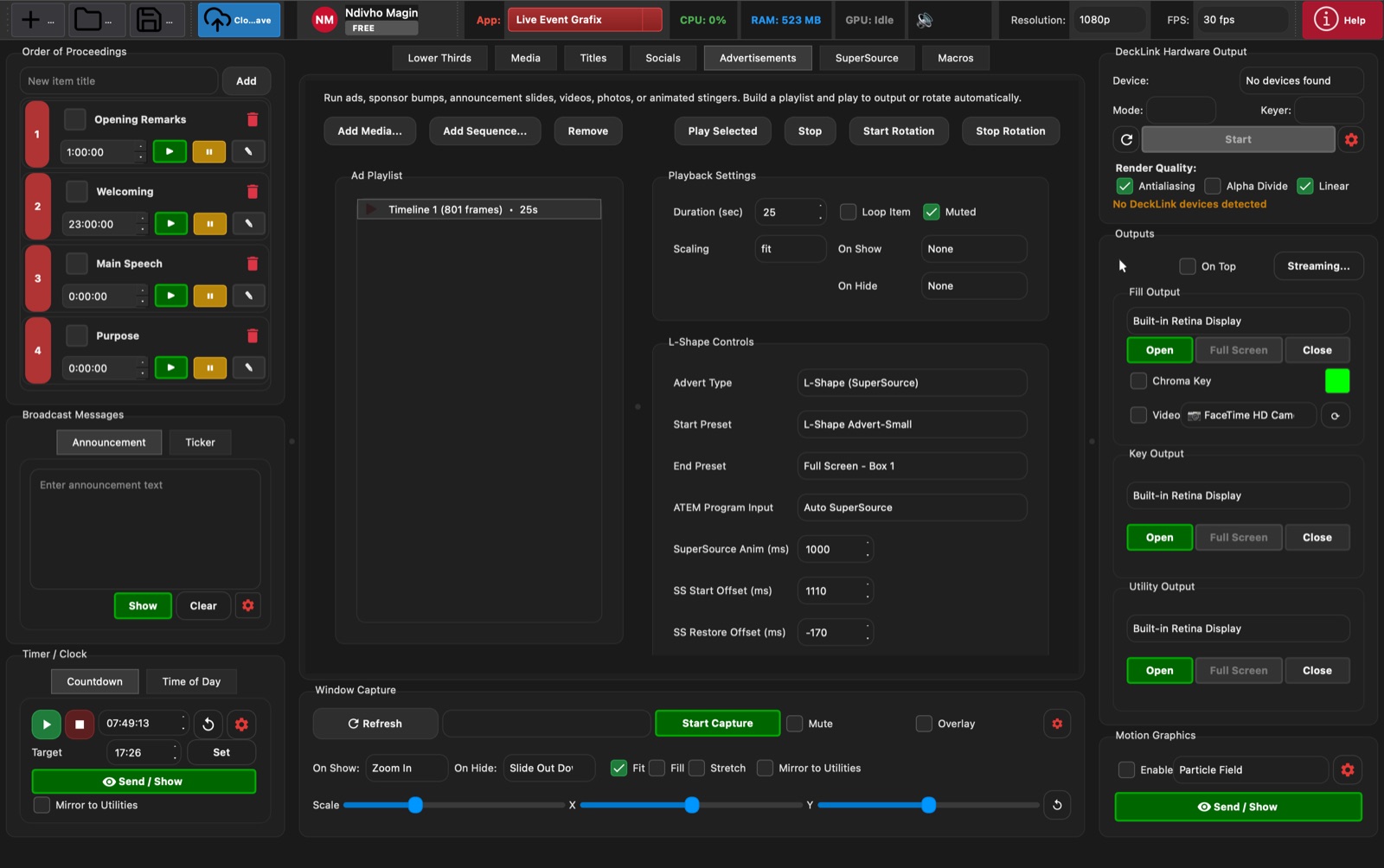
Advertisement Playlist and L-Shape Control
The Advertisements view is built for sponsor spots, ad rotations, custom sequences, and L-shape automation through SuperSource and ATEM timing controls.
- • Create playlist-based ad breaks and reusable sponsor sequences.
- • Start or stop rotation without interrupting the rest of the show controls.
- • Enable L-shape layouts and choose start/end SuperSource presets.
- • Tune ATEM program input, offsets, and timing for cleaner broadcast transitions.
Live Event Grafix
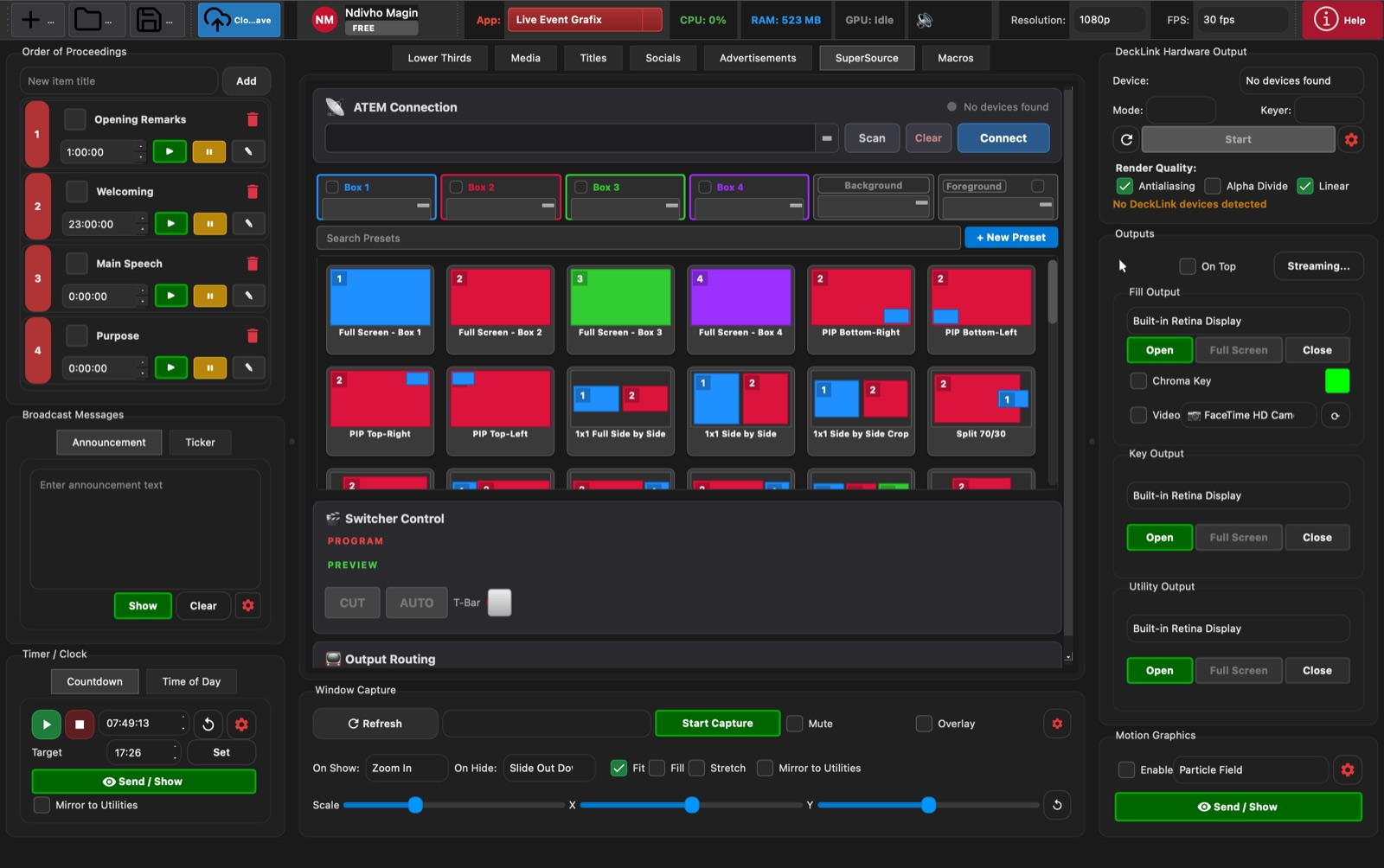
SuperSource Layouts
The SuperSource tab controls ATEM connection, box inputs, preset thumbnails, picture-in-picture layouts, switcher cuts, and output routing.
- • Scan for and connect to ATEM hardware from the SuperSource section.
- • Assign Box 1 through Box 4, background, and foreground sources.
- • Use preset thumbnails for full-screen, PiP, split, and side-by-side layouts.
- • Pair layouts with switcher control and output routing for live production.
Live Event Grafix
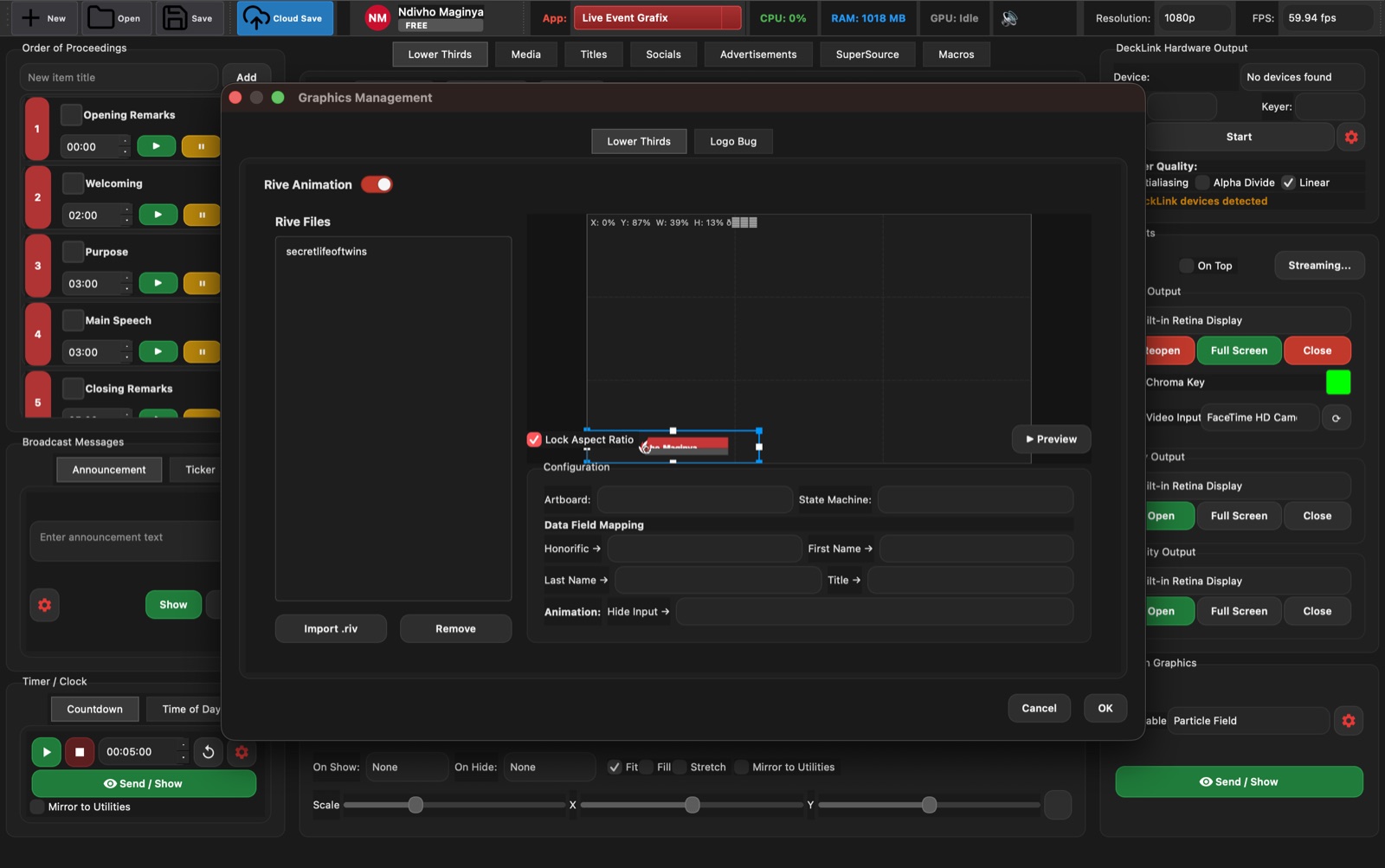
Graphics Management and Rive Templates
Graphics Management handles reusable Rive-based templates, field mapping, animation setup, logo assets, and positioning for broadcast graphics packages.
- • Import and manage .riv files for lower thirds and custom graphics.
- • Map operator fields into template inputs so show data lands in the right place.
- • Adjust positioning, dimensions, logo scale, and animation timing.
- • Preview and save configured graphics for reuse across events.
Live Soccer Grafix inside Live Event Grafix
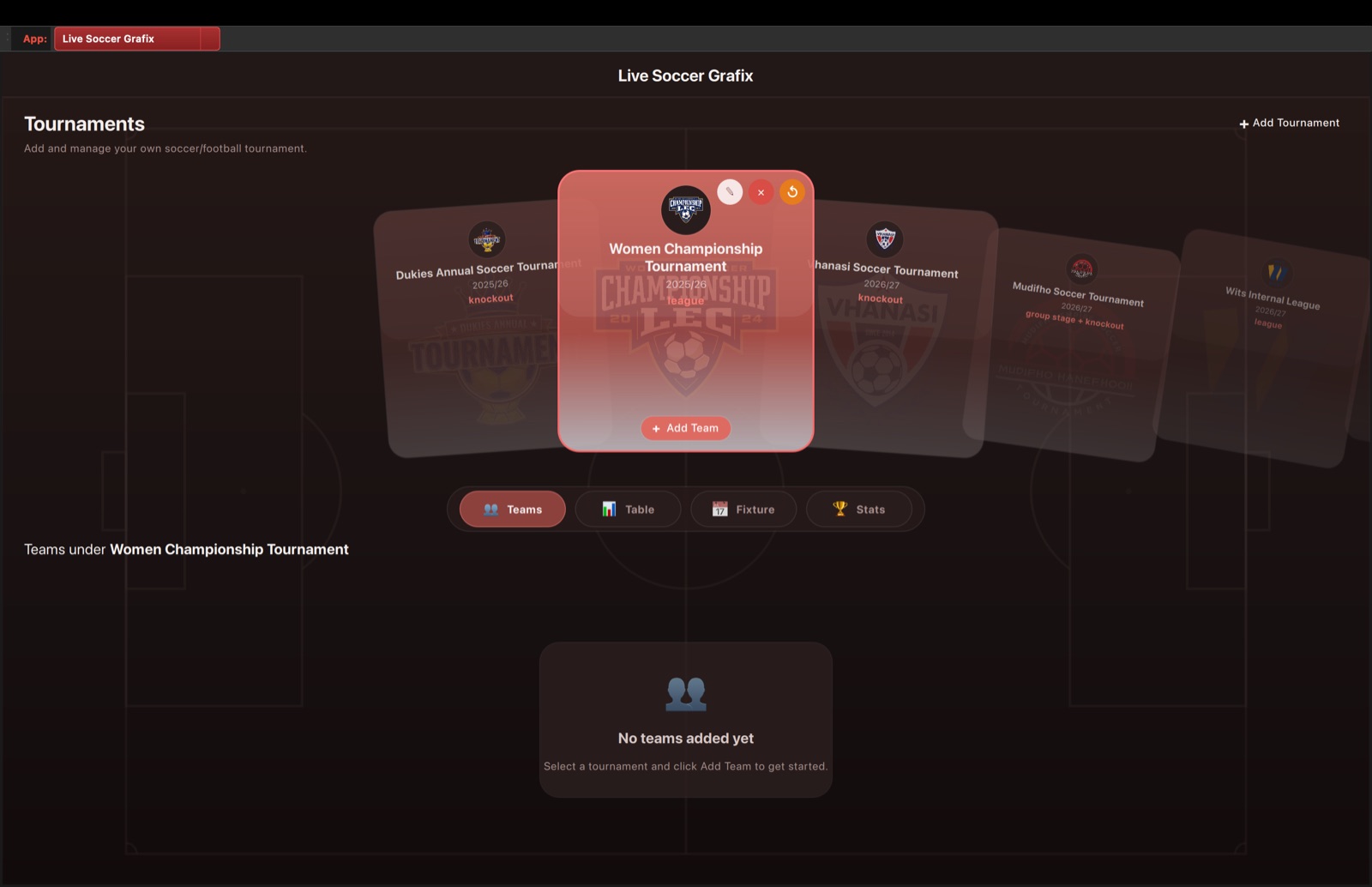
Tournament Dashboard
Live Soccer Grafix is launched inside Live Event Grafix from the app selector. The dashboard manages tournaments, teams, league tables, fixtures, and tournament statistics.
- • Switch from Live Event Grafix to Live Soccer Grafix using the app selector.
- • Create and select tournaments from the carousel workflow.
- • Move between Teams, Table, Fixture, and Stats without leaving the module.
- • Keep soccer operations inside the same Live Event Grafix shell as standard event graphics.
Live Soccer Grafix inside Live Event Grafix
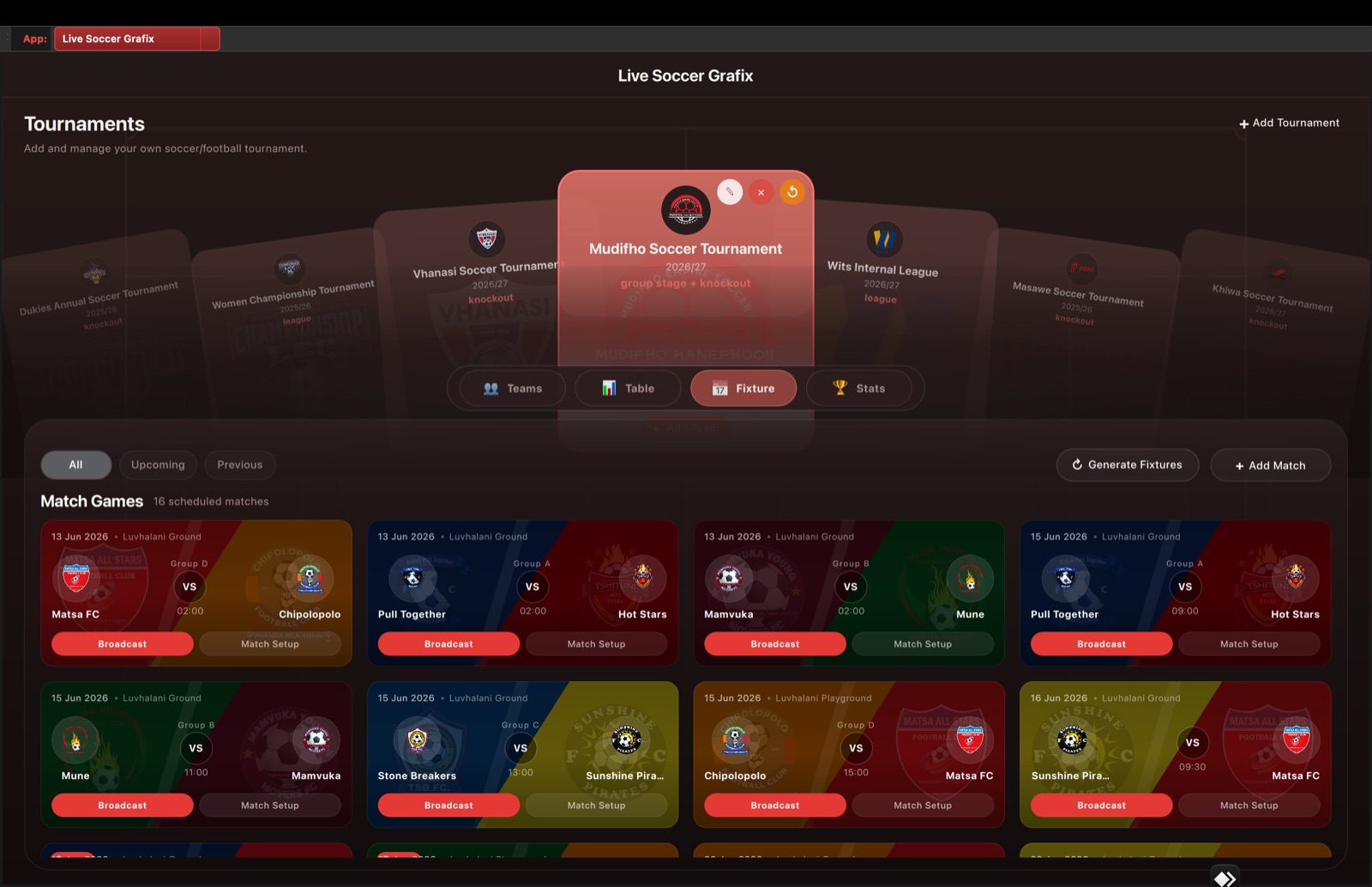
Fixture List and Match Entry Points
The Fixture view shows scheduled matches, teams, groups, locations, times, scores, and direct actions for Match Setup or Broadcast.
- • Filter fixtures by all, upcoming, and previous matches.
- • Generate fixture schedules from tournament data when needed.
- • Open Match Setup to confirm teams, players, officials, commentators, and venue data.
- • Jump into a broadcast workflow from a fixture card when the match is ready.
Live Soccer Grafix inside Live Event Grafix
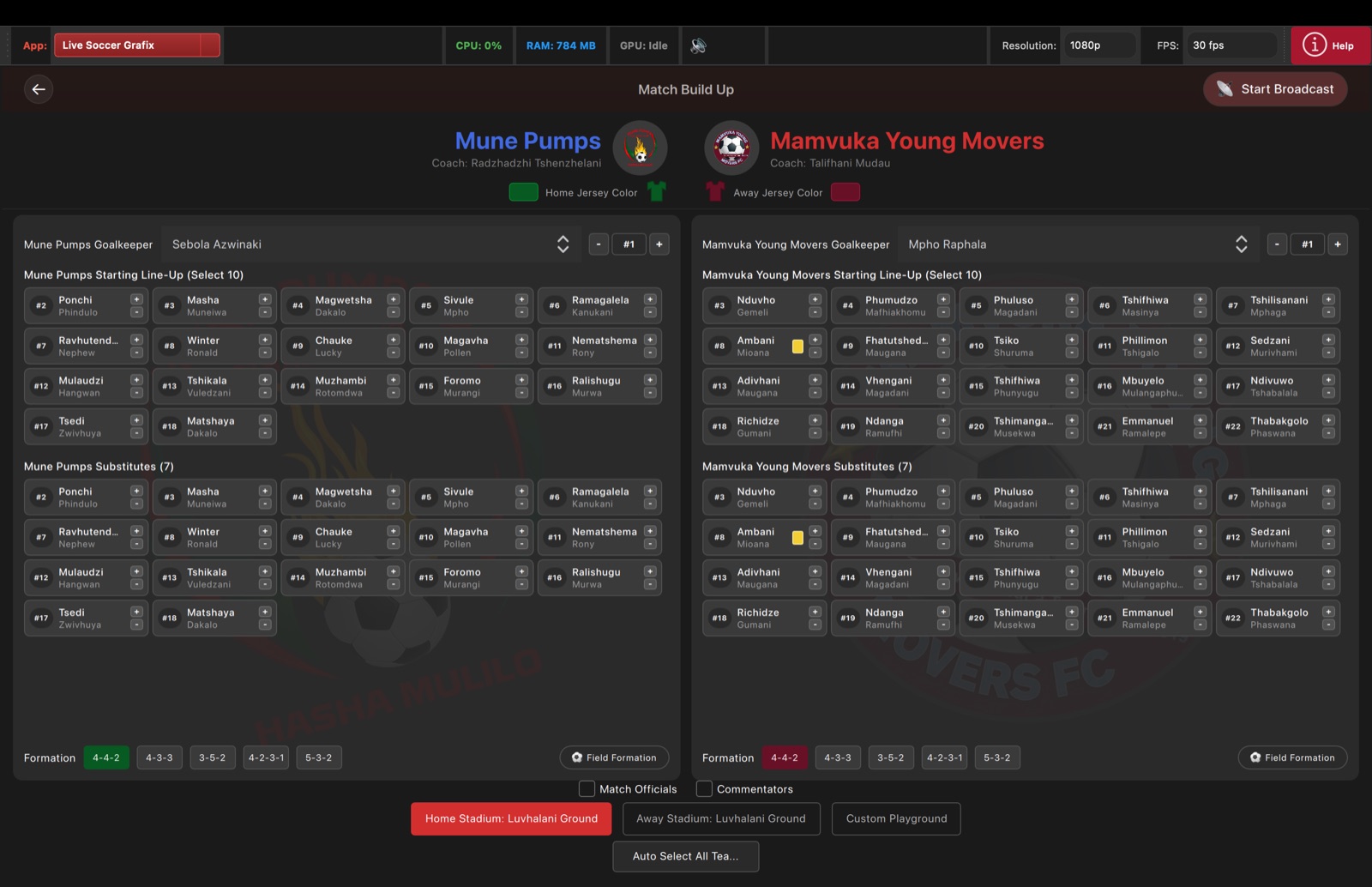
Match Build-Up View
Match Build-Up prepares a specific fixture before it goes live, including goalkeepers, starting lineups, substitutes, formations, jersey colours, officials, commentators, and stadium selection.
- • Review both teams, crests, coaches, goalkeepers, starters, and substitutes.
- • Select formations and jersey colours before sending graphics live.
- • Add officials, commentators, and stadium context for build-up graphics.
- • Use Start Broadcast only after the match setup is validated.
Live Soccer Grafix inside Live Event Grafix
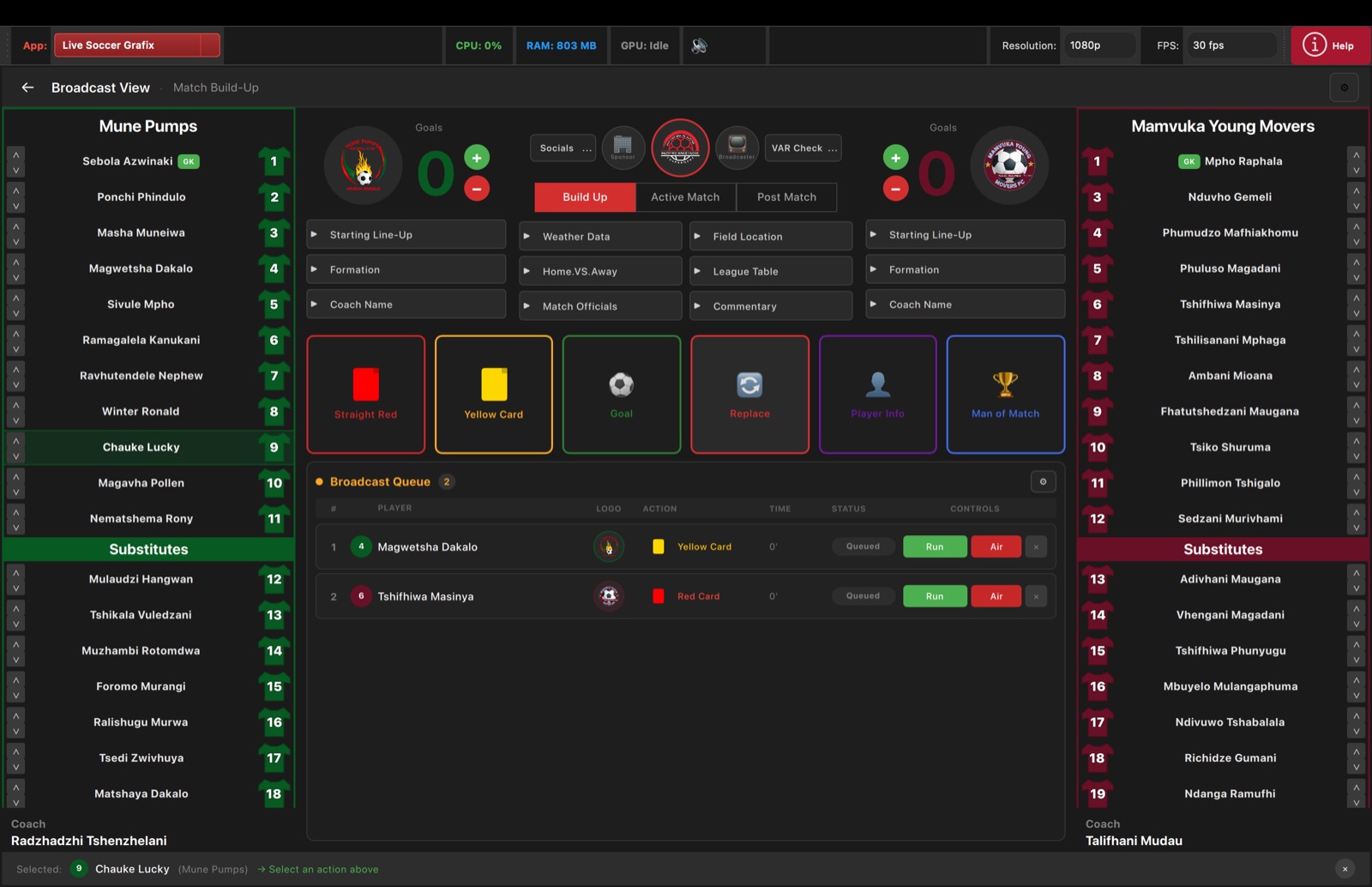
Broadcast View: Build-Up Graphics
Broadcast View gives the operator live scores, team lists, build-up graphic triggers, match-action tiles, and a queue for running graphics to air.
- • Run starting lineups, formations, coach names, weather, field location, and league-table graphics.
- • Select players from either side and pair them with action tiles such as cards, goals, replacements, and player info.
- • Queue graphics first, then run or air them with operator confirmation.
- • Keep both team rosters, substitutes, coaches, and selected player context visible during operation.
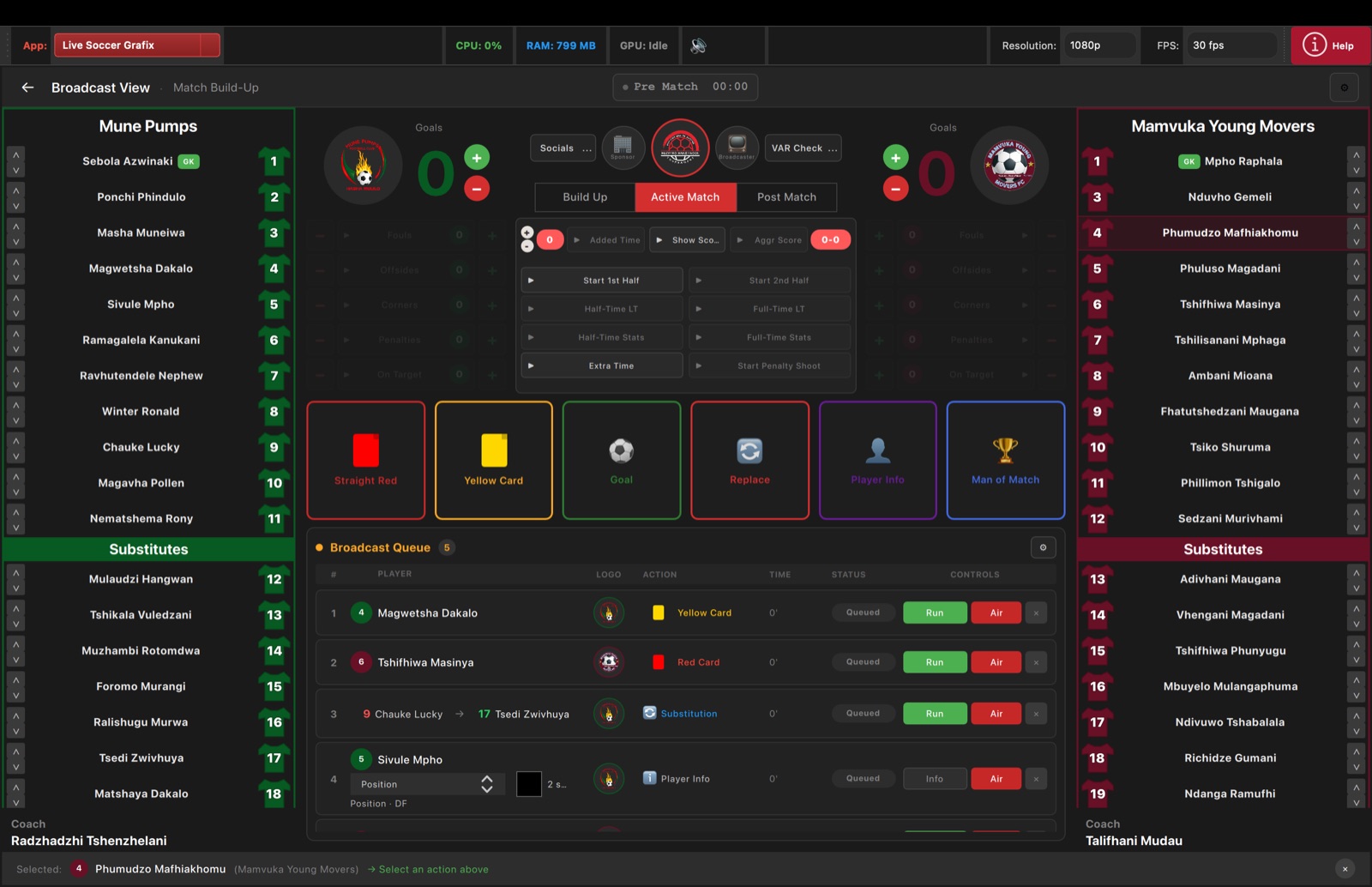
Live Soccer Grafix inside Live Event Grafix
Broadcast View: Active Match
The Active Match tab focuses on the live period clock, score changes, match phases, aggregate score, live stats, action triggers, and the broadcast queue.
- • Start first half, second half, extra time, penalties, half-time lower thirds, and full-time graphics.
- • Adjust goals and match stats from the center control area.
- • Trigger live actions such as red cards, yellow cards, goals, replacements, player info, and Man of the Match.
- • Monitor queued items and choose when each graphic should run or go to air.